What PageMosaic Can Do
🧩 Component-based Editing
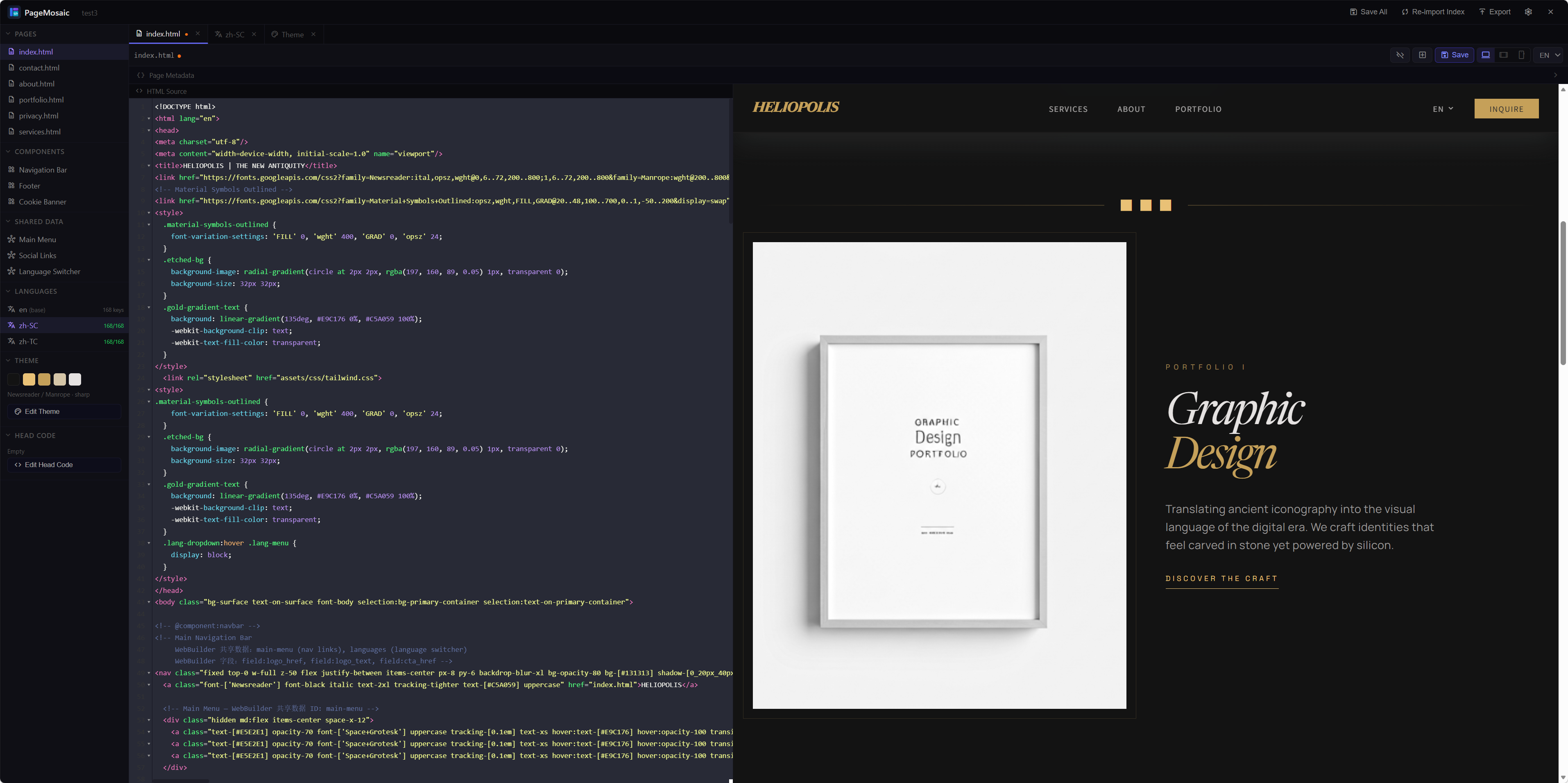
Define reusable blocks (navbar, footer, cookie consent) as components. Edit once — PageMosaic rewrites every page that uses it automatically.
🌍 Multi-language Support
Manage translation keys in a spreadsheet-style editor. Missing translations are highlighted. Each language gets its own output folder at export time.
🎨 Theme Editor
Visual color palette, typography, and border-radius controls. Choose between Tailwind CDN, Tailwind Local, or Custom CSS modes.
🖼 Live Preview
Desktop / Tablet / Mobile viewport switcher. Per-language preview. Instant hot-reload as you type in the code editor.
📥 Import Existing Sites
Drop any existing HTML folder into PageMosaic. It auto-detects headers, footers, and cookie banners and converts them into editable components.
📤 Export
Generates a clean output folder per language. Page metadata (title, description, OG tags, canonical) is injected automatically at export.
🤖 Built-in AI Assistant
Streaming chat panel with Plan/Act modes. Ask the AI to rewrite a page, translate missing i18n keys, or audit your component — and the code lands directly in the active editor.
🔌 Skill & Agent System
Extend the AI with reusable skills (e.g. HTML Cleanup, SEO Optimizer) and custom agent personas. Drop .skill.json or SKILL.md files into your library folder to activate them.
🪟 Split View
Toggle between Code-only, Preview-only, or side-by-side Split layout. Drag the resizer to give each panel exactly the space you need.
🔍 Search & Replace
Press Ctrl+F inside any code editor to open a persistent search panel. Real-time match highlighting, navigate matches, replace one or all.
💾 Session Persistence
The desktop app remembers your last Projects and Releases folder paths across restarts — no need to reconfigure every time you open PageMosaic.
Quick Start
Browser Mode — No Installation Required
# Clone the repository
git clone https://github.com/yukishama9/PageMosaic.git
cd PageMosaic

# Windows — double-click start.bat, or run:
start.bat

# macOS / Linux:
python3 -m http.server 8765
# Open http://localhost:8765/builder/ in your browser
Desktop App (Electron)
# Install dependencies
npm install

# Run in development mode (with DevTools)
npm run dev

# Run normally
npm start
On first launch, click Set next to Projects folder and Releases folder to configure where your work is stored. This is remembered across sessions.
CSS Modes
Configurable per project in Project Settings:
| Mode | Description |
|---|---|
| Tailwind CDN | Tailwind loaded from CDN. Theme config injected as a <script> block at runtime. Zero setup. |
| Tailwind Local | Uses a locally compiled assets/css/tailwind.css. In Electron mode, saving the Theme Editor auto-runs npx tailwindcss. |
| Custom CSS | No Tailwind. Theme Editor is disabled. Manage your own stylesheets directly — any framework or hand-written CSS. |
Why PageMosaic?
- No framework. No build step. Pure HTML files you own completely.
- Lightweight & portable. Runs as a desktop app or directly in the browser.
- Component reusability. Edit once, sync everywhere. Consistent UI across all pages.
- Multi-language ready. Built-in i18n — no manual translation duplication.
- Visual theme control. Adjust colors, fonts, and shapes without touching code.